Explore vs Brand Overview vs Reports
Ignyte IQ has three surfaces for viewing data: Brand Overview, Explore, and Reports. Each has a specific layout and is typically used for a different kind of question.
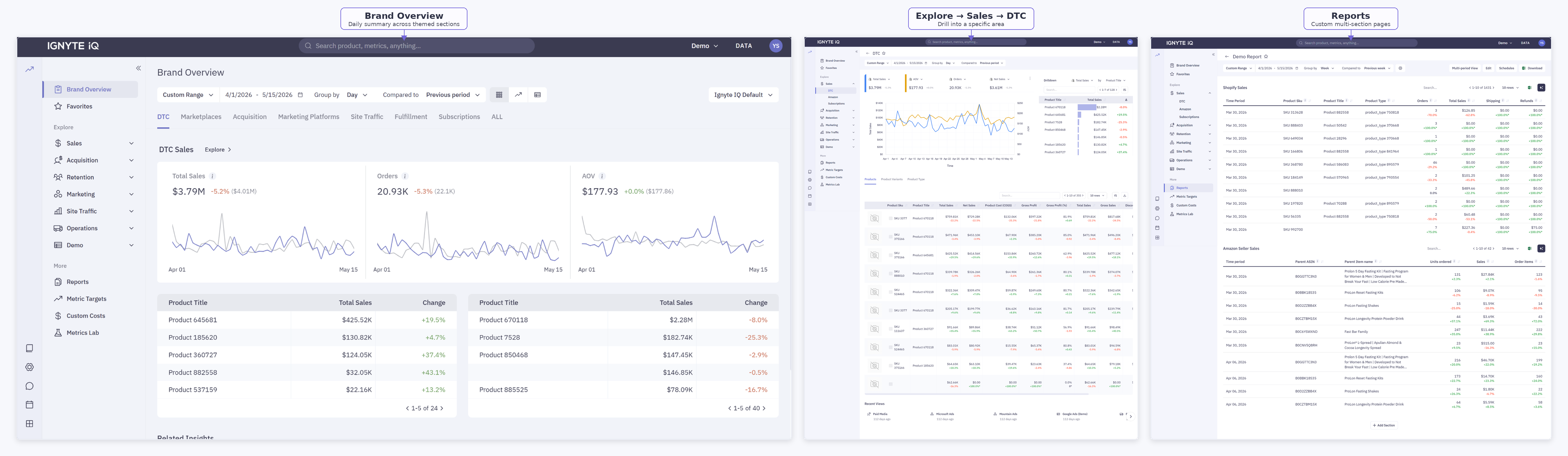
Summary comparison
Section titled “Summary comparison”| Surface | Layout | Typical use case |
|---|---|---|
| Brand Overview | Pre-built page with themed sections; same for every workspace | Daily summary check across all areas |
| Explore | Pre-built dashboards organized by functional area (Sales, Acquisition, Retention, Marketing, Site Traffic, Operations) | Drill into a specific area to investigate a change |
| Reports | Custom multi-section pages built from metric groups | Recurring exec-ready summaries; cross-source layouts |
When to use each
Section titled “When to use each”| Question | Open |
|---|---|
| What changed in the last 24 hours? | Brand Overview |
| Revenue dropped — which products contributed? | Explore → Sales → DTC |
| Which campaigns drove the most spend last week? | Explore → Acquisition or Marketing |
| How are cohorts retaining? | Explore → Retention |
| Build a weekly executive summary | Reports |
| Combine Shopify, Amazon, and ad performance on one page | Reports |
| Reuse a layout across multiple brands | Reports (duplicate the template) |
What changes between surfaces
Section titled “What changes between surfaces”| Element | Brand Overview | Explore | Reports |
|---|---|---|---|
| Page layout | Fixed | Fixed per dashboard | User-built |
| Date range, comparison, group-by | Per page | Per dashboard | Per section (with optional shared controls) |
| Drilldowns | Limited | Full | Per section |
| Export | Tile or table | Table | Full report or per section |
| Configuration save | Saved Views | Saved Views | The report itself |
Definitions and underlying data are consistent across all three surfaces. A “Revenue” tile on Brand Overview, Explore, and Reports uses the same definition from Metric Definitions.
Common questions
Section titled “Common questions”Can Reports replace Brand Overview?
A Report can replicate Brand Overview’s layout, but Brand Overview is consistent across users and workspaces by design. Most workspaces use both — Brand Overview for routine checks, Reports for layouts specific to a team or stakeholder.
Can Explore be reached from Brand Overview?
Yes. Most Brand Overview tiles link to the matching Explore dashboard. Click the tile body (not the ℹ️ icon).
Can an Explore dashboard configuration be saved?
Yes — as a Saved View. A View captures the current date range, comparison, group-by, filters, and active tab.