The ℹ️ panel
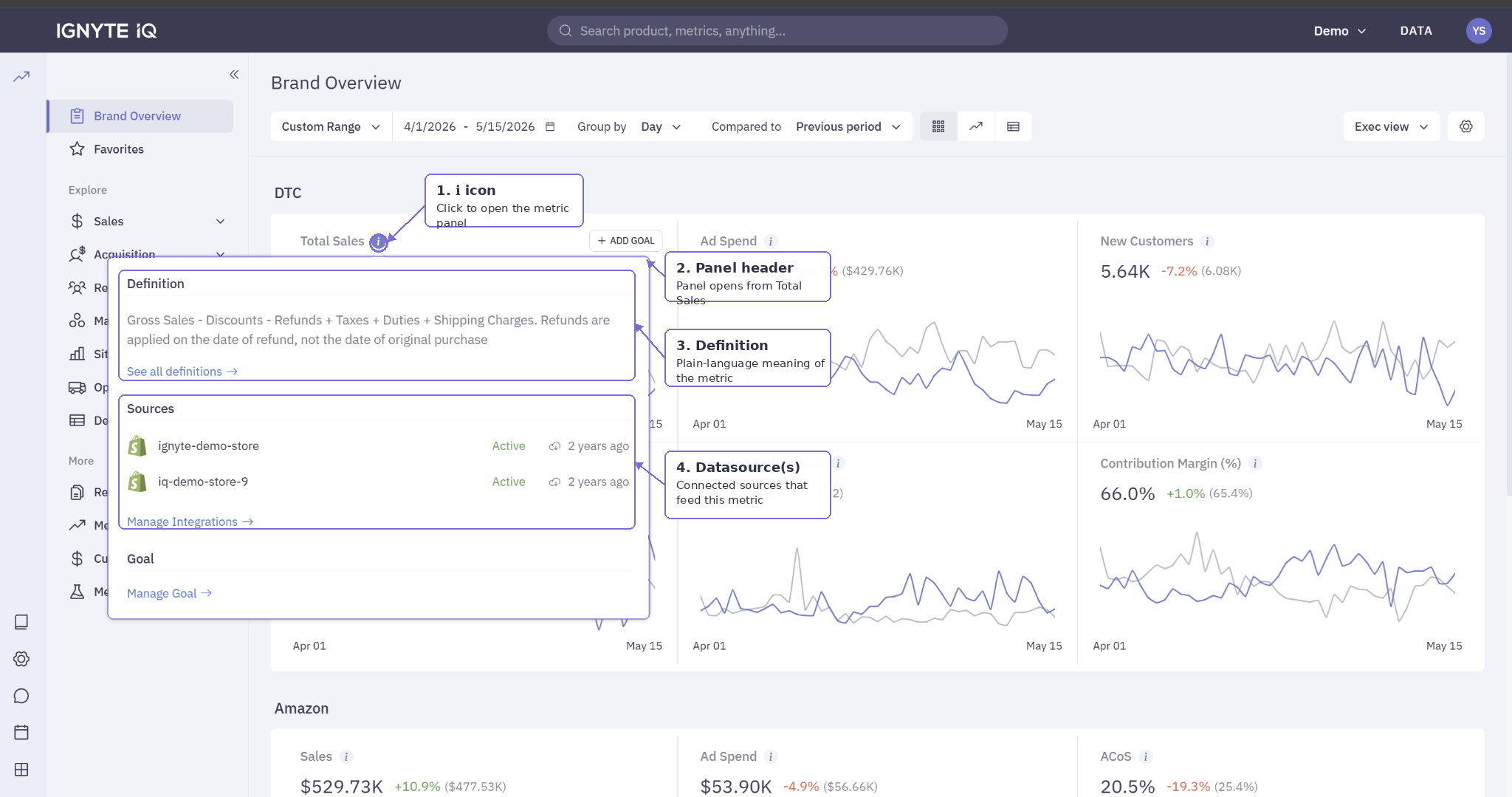
The ℹ️ panel is a per-metric information panel attached to each metric tile in Ignyte IQ. It contains the metric’s definition, the datasource(s) that feed it, calculation notes, and the time the metric was last calculated for the current view.
The ℹ️ panel is metric-specific. The Data panel is workspace-wide. They answer different questions:
| Panel | Shows | Scope |
|---|---|---|
| ℹ️ panel | Definition, datasource(s), last calculated for one metric | Per tile |
| Data panel | Connection status and last sync per datasource | Workspace-wide |
How to open it
Section titled “How to open it”Click the ℹ️ icon in the upper area of any metric tile. The panel opens beside or below the tile. Click outside to close.
What’s in the panel
Section titled “What’s in the panel”| Field | Contents |
|---|---|
| Metric name and definition | Plain-language meaning, sourced from Metric Definitions |
| Calculation notes | What’s included or excluded (refunds, discounts, tax, shipping); the formula in human terms |
| Datasource(s) | The connected source(s) that feed this metric, plus the date anchor used |
| Last updated | Time this metric was last calculated for the current view |
”Last updated” in the ℹ️ panel
Section titled “”Last updated” in the ℹ️ panel”The ℹ️ panel’s “last updated” is the time the metric was last calculated — distinct from the Data panel’s “last updated,” which is the time the datasource was last synced.
For most metrics, both timestamps agree to within minutes. For heavier calculations (cohorts, LTV trends), the metric timestamp can lag the source by an hour or more. See Data freshness and the ‘last updated’ timestamps.
Common questions
Section titled “Common questions”Why don’t some tiles have an ℹ️ icon?
Some tiles aggregate multiple metrics or show a chart-first view rather than a single value. The surrounding section description covers them.
Where do definitions come from?
From Metric Definitions, the workspace’s metric dictionary. Two tiles with the same name reference the same definition.
What if the definition doesn’t match expectations?
Cross-reference against Metric Definitions for the canonical entry. If the discrepancy persists, raise it with the team or contact support.