Ecommerce
Shopify, BigCommerce, WooCommerce, Amazon Seller. Provides orders, customers, products, refunds, fulfillment.
A datasource is a source platform connected to Ignyte IQ — Shopify, Google Ads, Klaviyo, and so on. Every metric in the product is computed from data pulled from one or more connected datasources. Ignyte IQ does not generate metrics from scratch.
The terms “datasource” and “integration” refer to the same thing. The Settings UI uses “Integrations”; the docs and the ℹ️ panel use “datasource.”
Ecommerce
Shopify, BigCommerce, WooCommerce, Amazon Seller. Provides orders, customers, products, refunds, fulfillment.
Ads
Google, Meta, TikTok, Pinterest, Microsoft, Amazon Ads. Provides spend, impressions, clicks, conversions.
Analytics
Google Analytics 4. Provides sessions, traffic sources, conversion rate, channel mix.
Email & SMS
Klaviyo. Provides sends, opens, clicks, attributed revenue.
Subscriptions
Recharge. Provides MRR, churn, take rate, recurring revenue.
Payments & costs
Stripe for payments and refunds. CSV upload for COGS and custom fees.
The full list, including per-platform setup guides, lives in Integrations.
A single datasource powers many metrics. Shopify, for example, feeds Revenue, Orders, AOV, New Customers, Returning Customers, Repurchase Rate, and more.
Some metrics combine inputs from multiple datasources. Blended ROAS uses spend from every connected ad platform combined with revenue from the ecommerce source.
The ℹ️ panel on any tile lists which datasource(s) contribute to that metric.
Datasource connections are workspace-specific. A Shopify store connected in Workspace A is not connected in Workspace B. Each workspace maintains its own set of datasources.
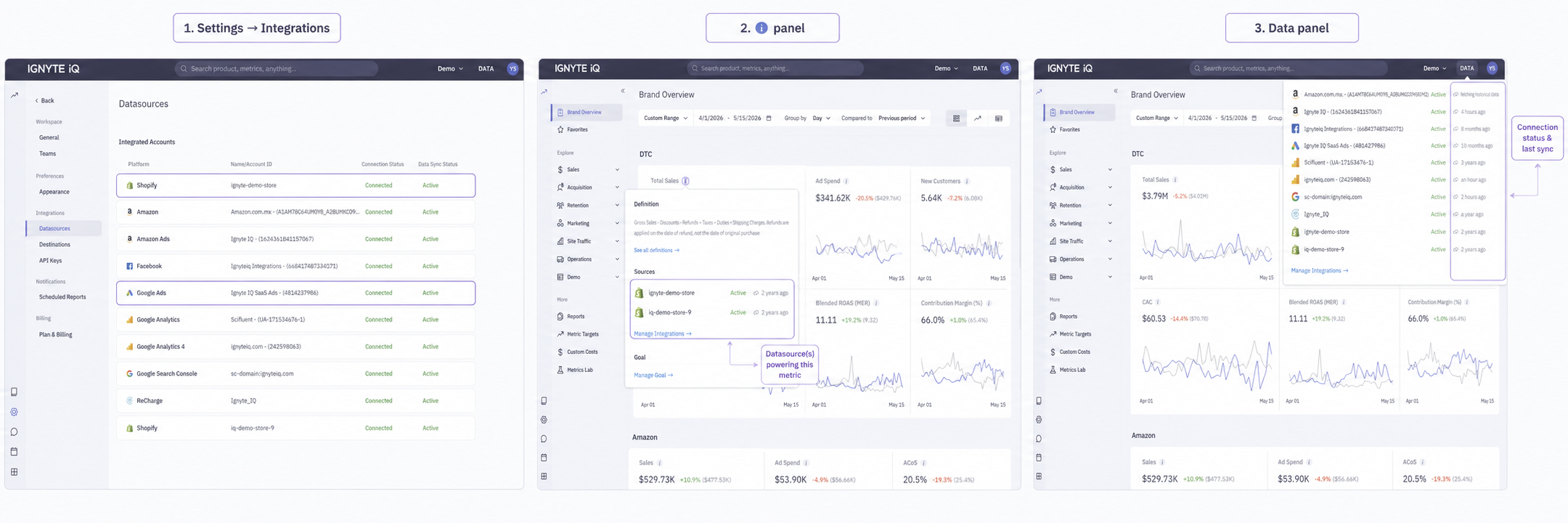
| Surface | Use for |
|---|---|
| Settings → Integrations | Add, reconnect, or remove a datasource. |
| Data panel (top-right) | View connection status and last sync time for every datasource in the workspace. |
| ℹ️ panel (on any tile) | View which datasource(s) power a specific metric and when it was last calculated. |
Does Ignyte IQ store a copy of source data?
Yes. Datasources sync on a schedule, and the data is stored in Ignyte IQ so dashboards can render. Access to source platforms is read-only.
What happens to historical data if a datasource is disconnected?
Some historical data may remain available; future syncing stops. Tiles that depend on the disconnected datasource will show stale data.
Can the same Shopify store be connected to two workspaces?
Yes.
Why do two metrics with similar names show different values?
They are powered by different datasources, or they use different date anchors. The ℹ️ panel shows which.